

Introduction
NeoDen IN6 is widely used in small SMT production lines, R&D laboratories, and prototype development due to its compact size and full hot-air convection design. However, because the IN6 has a relatively compact body, its physical zone length and thermal capacity differ fundamentally from those of large industrial chain-type ovens. Determining how to calibrate temperature profiles compliant with IPC standards for leaded or lead-free (e.g., SAC305) processes on this 6-zone device (which physically consists of 3 sets of dual-sided heating zones) is critical to achieving board-level soldering yield.
This article will dissect the IN6's heating architecture from the perspective of an SMT process engineer and provide a practical guide for curve calibration and defect correction based on actual production.
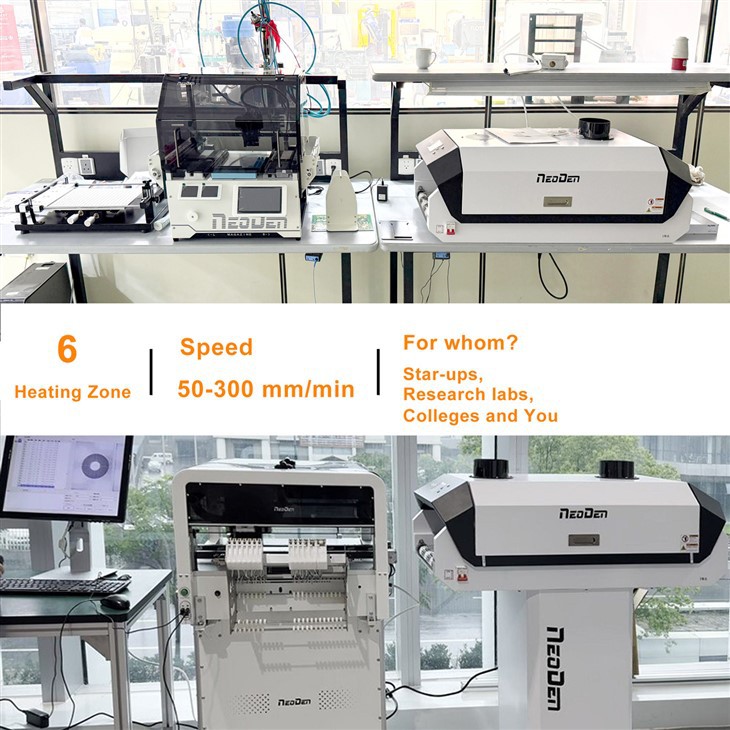
NeoDen IN6 Temperature Zone Architecture and Configuration Principles

1. Advantages of 6 Independent Temperature Zones
NeoDen IN6 features 6 heating zones. Compared to traditional small-scale reflow ovens, multiple temperature zones allow for more precise control over the rate of temperature rise and dwell time.
- Full Hot Air Convection Technology: This ensures uniform heating across the PCB surface, effectively preventing the "shadow effect" (where large components block smaller ones, preventing proper solder penetration) commonly associated with infrared heating.
- Independent Control: The target temperature for each zone can be fine-tuned based on the complexity of the PCB.
2. Key Variables Affecting the Profile
Before clicking "Run," you must consider the following three practical factors:
- PCB Physical Properties: Is the board a thin 0.8mm board or a thick 2.0mm multilayer board? Thicker boards require longer preheating times to absorb heat.
- Component Density: If the board contains large inductors or shielding covers, they act as "heat sinks" and slow down the rise in local temperatures.
- Solder Paste Characteristics: Whether using traditional leaded solder paste or mainstream SAC305 lead-free solder paste, their requirements for the liquidus and peak temperature differ.
Practical Guide: 4 Key Steps to Setting the Perfect Curve
We have translated the technical language from the NeoDen IN6 user manual into a set of actionable SOPs.
Step A: Parameter Calibration for the Preheat and Soaking Zones
- Purpose: Gradually raise the PCB temperature to evaporate solvents in the flux and activate the flux to remove oxidation layers from the pad surfaces.
- Parameter Settings: According to NeoDen IN6 user manual, the temperature gradient in the initial heating zone should be controlled between 1°C/s and 3°C/s. If the temperature rises too quickly, the solvents in the flux will boil violently, causing explosive splatter-the primary cause of "solder balls."
- Hold Time: Typically maintained between 120°C and 170°C for 60–120 seconds to allow the entire board (including large electrolytic capacitors) to reach thermal equilibrium.
Step B: Controlling Peak Temperatures in the Reflow Zone
- Peak Temp: For lead-free processes, the target is typically 230°C–250°C. Note that the temperature displayed by the NeoDen IN6 is the heating element temperature; the actual PCB temperature may be slightly lower and requires compensation using a temperature probe.
- Time Above Liquidus (TAL): The time the solder remains in a molten state should be between 40 and 90 seconds. If the time is too short, wetting will be poor, resulting in dull solder joints. If too long, the intermetallic compound (IMC) layer will become too thick, causing the solder joints to become brittle and prone to fracture.
Step C: Speed Control in the Cooling Zone
- Principle: Rapid cooling results in finer grain crystallization and higher strength in the solder joints.
- Note: However, cooling must not be too rapid (typically recommended to be below 4°C/s). Otherwise, due to the different coefficients of thermal expansion (CTE) between the PCB substrate and ceramic capacitors, micro-cracks may form in the capacitors.
Step D: Measurement and Verification
NeoDen IN6 features an intelligent temperature profile testing system. Connect thermocouple sensors to key pads on the test board and run the board through the IN6. Use the software to verify whether the actual measured profile falls within the "Process Window" provided by the solder paste supplier.
How to Resolve Common Soldering Defects by Adjusting the Curve?
Even when using the NeoDen IN6, issues may still arise if the curve is not properly adjusted. The following are practical tuning solutions:
| Defect Manifestation | Root Cause (Process-Related) | NeoDen IN6 Targeted Fine-Tuning Solution |
| Solder Beads | Too rapid temperature rise during the preheat stage, causing solvent evaporation and spatter. | Lower the set temperatures for Zone 1 and Zone 2, or slightly increase the conveyor belt speed in the software. |
| Tombstoning | Uneven thermal capacity between the component's two pads causes solder paste to melt at different rates, resulting in surface tension imbalance. | Increase the temperatures for Zone 3 and Zone 4, or slow down the conveyor belt speed to extend the constant-temperature duration in the wetting zone, thereby reducing the temperature difference across the entire board. |
| Bridging | Excessive collapse of the solder paste during the preheating/isothermal phase, or insufficient heat in the reflow zone causing slow wetting. | Check if the isothermal zone duration is too long, causing the flux to degrade. If localized non-wetting occurs, increase the temperature of Zone 5 to enhance local thermal compensation. |
| Discoloration | Localized overheating of the PCB causes the surface solder mask (green paint) to burn. | Reduce the overall top temperature setting. The IN6 features independent top and bottom temperature control; you can appropriately lower the top Zone 5/6 temperatures while allowing the corresponding bottom temperature zones to provide basic thermal compensation. |
Advanced Tips for Improving NeoDen IN6 Efficiency
1. Environmental Protection and Maintenance: Built-in Filtration System
NeoDen IN6's unique built-in smoke filtering system not only protects employee health but also indirectly safeguards temperature control accuracy.
Maintenance Recommendation: Inspect the filter regularly. If the filter cotton becomes clogged with rosin grease, it will impair internal hot air circulation efficiency, leading to temperature fluctuations.
2. Special Strategies for "Double-Sided Soldering"
When performing double-sided soldering, heavy components on the first side may fall off as the second side passes through the reflow oven.
Tip: When soldering the second side, you can slightly lower the temperature of the bottom zone or apply red adhesive to the bottom layer at points where components are prone to falling off.
3. Energy-Saving Mode and Quick Line Change
The IN6 preheats very quickly. If you manage multiple projects, we recommend creating a "parameter comparison chart" to record the ideal speeds and temperature zone values for PCBs of different thicknesses, enabling production line changes within minutes.

Conclusion
Adjusting reflow soldering temperature profiles is an engineering practice based on the principles of heat conduction. The core logic for calibrating NeoDen IN6 can be summarized as follows: focus on the slope during the preheating phase (to control solder balls), on time during the isothermal phase (to control tombstoning and temperature differentials), and on peak temperature and TAL during the reflow phase (to ensure strength). By making full use of the built-in temperature probes for quantitative testing, this compact device can deliver consistent, industrial-grade soldering quality.
Would you like to receive customized temperature curve recommendations for your PCB products?